
IP address management that doesn't depend on who last opened the spreadsheet.
Every enterprise tracks its IP addresses somewhere. Usually that somewhere is a spreadsheet that was right the day it was made. Kubernesis IPAM replaces it with a live system of record, one that updates itself because it is connected to the DHCP, DNS and discovery that actually run your network.
— The situation
Three spreadsheets, and each one is right about something.
The network team has one. The server team has another. The cloud team has a third, kept in a different format. A new application needs a subnet in the data centre, and it takes a day of emails to confirm the range is free.
It wasn’t. The same range had been used for a cloud network connected last quarter. Traffic started going to the wrong place, and the first sign of trouble was an outage call.
This is not carelessness. Address space changes every day: a project team adds a subnet, a contractor plugs into a port, a VM is created and deleted, someone leaves. A document can’t keep up with that. A system connected to the network can.
— Capabilities
What you get.
A live inventory of every address
Each IP shows its status (DHCP, static, reserved, free or abandoned) along with MAC address, hostname, owner, location and when it was last seen.
Automatic discovery
Scheduled and event-driven discovery scans subnets, switches and cloud accounts. Devices using addresses that were never recorded are found and flagged, not left for someone to stumble on.
Structured address planning
Organise your space from top-level blocks down to regions, sites and subnets. Templates make sure every new branch gets its user, voice, guest, CCTV and management networks laid out the same way.
Next available subnet or IP, on request
Ask for a subnet of a given size in a given site and get one that is genuinely free. The DNS records are created at the same time.
Overlap and conflict detection
Before a range is allocated, it is checked against on-premises networks and cloud address space. Overlaps are caught during planning, not during an incident.
Hybrid and multi-cloud IPAM
AWS, Microsoft Azure and Google Cloud networks are discovered and reconciled against your internal address plan, alongside cloud DNS zone sync.
Utilisation reports and reclaim
See how full each subnet is, how fast it is filling and which addresses haven’t been seen in weeks. Take unused space back before buying or carving out more.
IPv6 planning
Plan and track IPv6 prefixes next to IPv4, so dual-stack projects start from a clean plan rather than a blank sheet.
VLAN and VRF mapping
Link subnets to the VLANs and routing domains they live in, so the address plan reflects how the network is actually built.
Custom fields for ownership
Tag subnets and addresses with the application, cost centre, project and owner. Audits stop being a hunt for the person who knows.
Roles, approvals and audit trail
Teams see and change only the space they are responsible for. Sensitive changes can require approval, and every change is recorded.
REST API and provisioning hooks
Teams see and change only the space they are responsible for. Sensitive changes can require approval, and every change is recorded.
— IPAM and security
An IP address is evidence.
When your security team sees an IP in an alert, the first question is always the same: what is this, whose is it, and where is it? IPAM answers that in one place. Combined with DHCP lease history and DNS query logs, you can trace an address to a device, an owner and a location at a specific point in time.
- Unrecorded devices and unauthorised static IPs flagged by discovery
- Address, device and owner data shared with Kubernesis MDM and PAM
- Blocked queries from Protective DNS attributed to a real device, not just an IP
- A change history your auditors can actually read
— Migration
Getting off the spreadsheet.
Most estates we see run a mix: Windows DHCP at head office, something else at the branches, and a few routers handing out addresses nobody remembers setting up. Moving to one managed service doesn’t need a weekend of risk.
Assess
We import your existing spreadsheets and IPAM exports, run discovery, and hand you the gap list: addresses in use but not recorded, recorded but not in use, and ranges that overlap.
Design
We agree the hierarchy, naming, custom fields and who is responsible for which space.
Deploy
Data is cleaned and loaded, discovery is scheduled, and DHCP and DNS are connected so the records keep themselves up to date.
Operate
Support under an agreed SLA, from a team in Gurugram that knows your estate.
— Deployment
What a clean branch plan looks like.
| Network | Example size | How it's handled |
|---|---|---|
| User LAN | /23 | DHCP with standard working-day leases |
| Voice | /24 | DHCP with call-server options |
| Guest Wi-Fi | /23 | Short leases, kept separate from the corporate network |
| CCTV and IoT | /25 | Reservations, covered by Protective DNS |
| Management | /27 | Static addresses, restricted access |
What is IPAM?
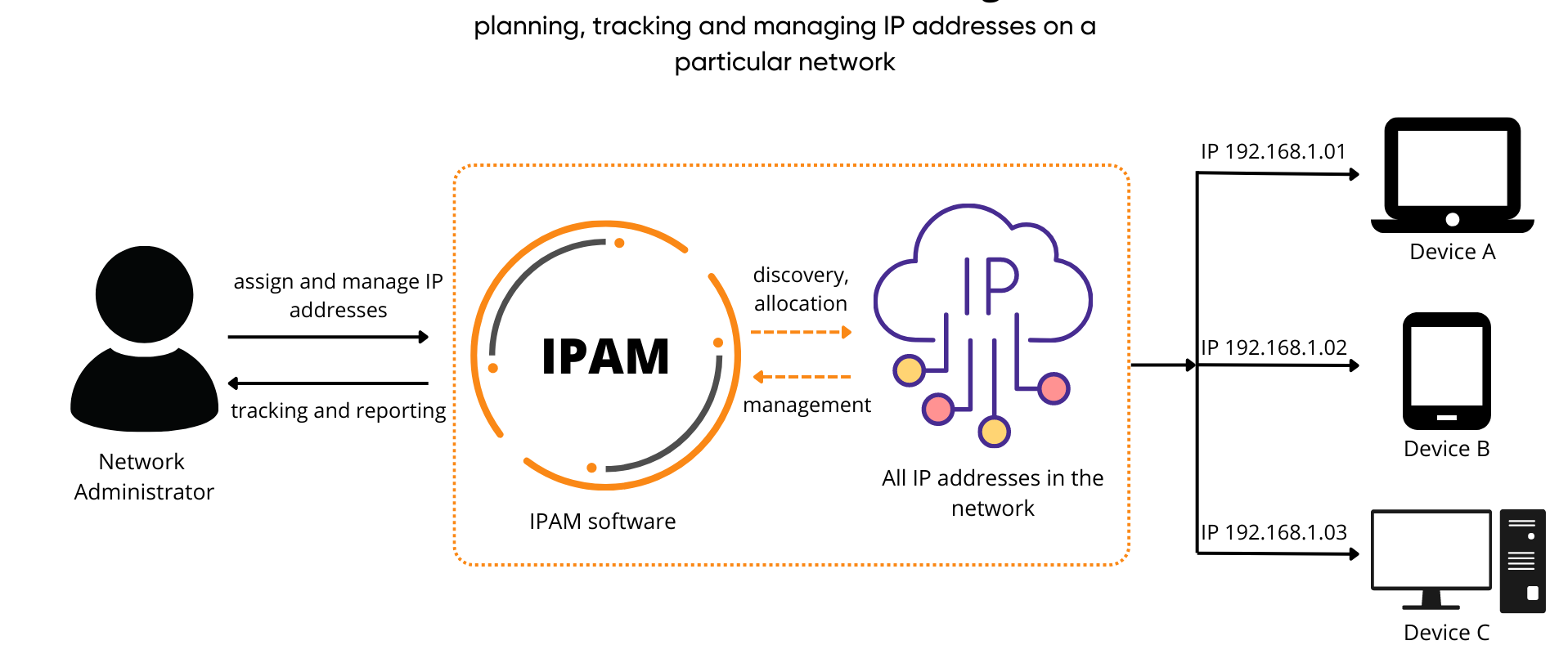
IPAM (IP address management) is software that plans, tracks and manages the IP addresses and subnets used across your network. Good IPAM connects to DHCP and DNS so its records stay accurate on their own.
Why not just use a spreadsheet?
Does it work with AWS, Azure and Google Cloud?
Can we import our existing spreadsheets?
Yes. Importing your current data is the first step of every deployment, and discovery then checks it against what is really on the network.
What is the difference between IPAM and DHCP?
DHCP hands out addresses to devices. IPAM is the plan and the record: which ranges exist, who owns them and what is using each address. With DDI, the two are linked, so every DHCP lease updates IPAM automatically.